Blog

  • Understand core components and explore flow types

    To create a Large Language Model (LLM) application with prompt flow, you need to understand prompt flow’s core components.

    Understand a flow

    Prompt flow is a feature within Azure AI Foundry that allows you to author flows. Flows are executable workflows often consist of three parts:

    1. Inputs: Represent data passed into the flow. Can be different data types like strings, integers, or boolean.
    2. Nodes: Represent tools that perform data processing, task execution, or algorithmic operations.
    3. Outputs: Represent the data produced by the flow.
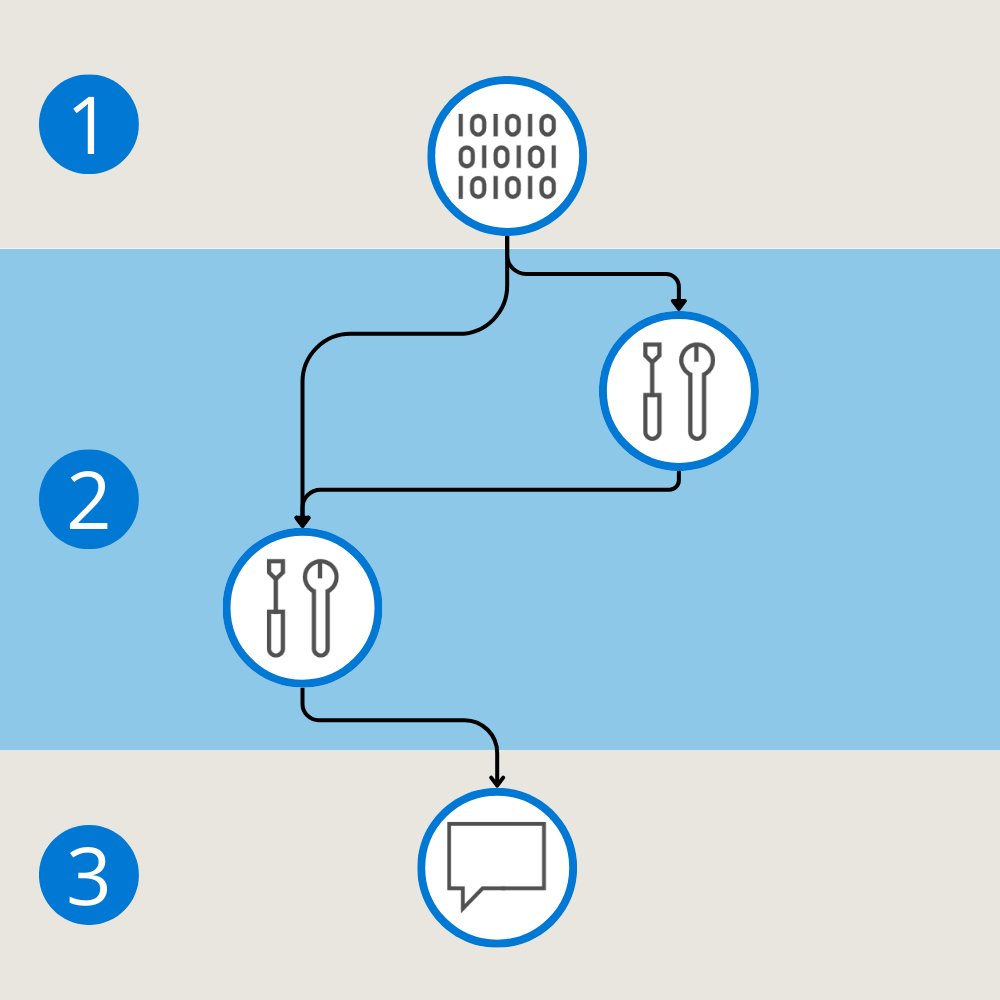
    Diagram of the three components of a flow pipeline.

    Similar to a pipeline, a flow can consist of multiple nodes that can use the flow’s inputs or any output generated by another node. You can add a node to a flow by choosing one of the available types of tools.

    Explore the tools available in prompt flow

    Three common tools are:

    • LLM tool: Enables custom prompt creation utilizing Large Language Models.
    • Python tool: Allows the execution of custom Python scripts.
    • Prompt tool: Prepares prompts as strings for complex scenarios or integration with other tools.

    Each tool is an executable unit with a specific function. You can use a tool to perform tasks like summarizing text, or making an API call. You can use multiple tools within one flow and use a tool multiple times.

     Tip

    If you’re looking for functionality that is not offered by the available tools, you can create your own custom tool.

    Whenever you add a new node to your flow, adding a new tool, you can define the expected inputs and outputs. A node can use one of the whole flow’s inputs, or another node’s output, effectively linking nodes together.

    By defining the inputs, connecting nodes, and defining the desired outputs, you can create a flow. Flows help you create LLM applications for various purposes.

    Understand the types of flows

    There are three different types of flows you can create with prompt flow:

    • Standard flow: Ideal for general LLM-based application development, offering a range of versatile tools.
    • Chat flow: Designed for conversational applications, with enhanced support for chat-related functionalities.
    • Evaluation flow: Focused on performance evaluation, allowing the analysis and improvement of models or applications through feedback on previous runs.

    Now that you understand how a flow is structured and what you can use it for, let’s explore how you can create a flow.

    citrix certification malaysia

  • Understand the development lifecycle of a large language model (LLM) app

    Before understanding how to work with prompt flow, let’s explore the development lifecycle of a Large Language Model (LLM) application.

    The lifecycle consists of the following stages:

    Diagram of the four stages of the development lifecycle.
    1. Initialization: Define the use case and design the solution.
    2. Experimentation: Develop a flow and test with a small dataset.
    3. Evaluation and refinement: Assess the flow with a larger dataset.
    4. Production: Deploy and monitor the flow and application.

    During both evaluation and refinement, and production, you might find that your solution needs to be improved. You can revert back to experimentation during which you develop your flow continuously, until you’re satisfied with the results.

    Let’s explore each of these phases in more detail.

    Initialization

    Imagine you want to design and develop an LLM application to classify news articles. Before you start creating anything, you need to define what categories you want as output. You need to understand what a typical news article looks like, how you present the article as input to your application, and how the application generates the desired output.

    In other words, during initialization you:

    Diagram of the four steps during initialization.
    1. Define the objective
    2. Collect a sample dataset
    3. Build a basic prompt
    4. Design the flow

    To design, develop, and test an LLM application, you need a sample dataset that serves as the input. A sample dataset is a small representative subset of the data you eventually expect to parse as input to your LLM application.

    When collecting or creating the sample dataset, you should ensure diversity in the data to cover various scenarios and edge cases. You should also remove any privacy sensitive information from the dataset to avoid any vulnerabilities.

    Experimentation

    You collected a sample dataset of news articles, and decided on which categories you want the articles to be classified into. You designed a flow that takes a news article as input, and uses an LLM to classify the article. To test whether your flow generates the expected output, you run it against your sample dataset.

    Diagram of the four steps during experimentation.

    The experimentation phase is an iterative process during which you (1) run the flow against a sample dataset. You then (2) evaluate the prompt’s performance. If you’re (3) satisfied with the result, you can move on to evaluation and refinement. If you think there’s room for improvement, you can (4) modify the flow by changing the prompt or flow itself.

    Evaluation and refinement

    When you’re satisfied with the output of the flow that classifies news articles, based on the sample dataset, you can assess the flow’s performance against a larger dataset.

    By testing the flow on a larger dataset, you can evaluate how well the LLM application generalizes to new data. During evaluation, you can identify potential bottlenecks or areas for optimization or refinement.

    When you edit your flow, you should first run it against a smaller dataset before running it again against a larger dataset. Testing your flow with a smaller dataset allows you to more quickly respond to any issues.

    Once your LLM application appears to be robust and reliable in handling various scenarios, you can decide to move the LLM application to production.

    Production

    Finally, your news article classification application is ready for production.

    Diagram of the three steps during production.

    During production, you:

    1. Optimize the flow that classifies incoming articles for efficiency and effectiveness.
    2. Deploy your flow to an endpoint. When you call the endpoint, the flow is triggered to run and the desired output is generated.
    3. Monitor the performance of your solution by collecting usage data and end-user feedback. By understanding how the application performs, you can improve the flow whenever necessary.

    Explore the complete development lifecycle

    Now that you understand each stage of the development lifecycle of an LLM application, you can explore the complete overview:

    Diagram of all stages including their steps of the development lifecycle.

    cisco certification training courses malaysia

  • Explore GPT technology

    Now that you have access to Copilot, set up your account, and have the latest tips to engage with Copilot you’re ready to get started with Copilot. Before you begin, it’s good to have a general sense of the technology behind this AI companion.

    GPTs, or Generative Pretrained Transformers, are AI models that advanced our understanding of AI. These models excel at interpreting and generating human language. The ‘G’ in GPT stands for “Generative,” emphasizing their ability to produce original content. The ‘P’ stands for “Pretraining,” referring to the extensive training these models undergo on diverse datasets before they can be fine-tuned for specific tasks. The ‘T’ stands for “Transformer,” denoting the underlying architecture that enables these models to handle large amounts of data efficiently and generate complex outputs.

    Microsoft Copilot is powered by a variant of the GPT model, designed to assist users with a multitude of tasks. This advanced AI technology enhances Copilot’s ability to provide valuable assistance in various scenarios:

    Design Tasks: Copilot can help create images and other visual content, making it a versatile tool for designers.

    Travel Planning: It can offer destination ideas, find flight prices, and help plan vacations, ensuring you get the best travel experience.

    Cooking Assistance: Whether you need dinner ideas or specific recipes, Copilot can generate suggestions based on your preferences.

    Fitness Guidance: Copilot can generate personalized workout plans and provide fitness tips to help you stay healthy and active.

    Microsoft Copilot

    Powered by GPT: Microsoft Copilot is built on a variant of the GPT model, designed to assist users with a multitude of tasks. By leveraging the advanced capabilities of GPT, Copilot can provide valuable support in areas such as design, travel planning, cooking, and fitness

    Integration: Copilot is integrated into various Microsoft products, including Microsoft 365, Bing, and Microsoft Edge, making it accessible across different platforms and enhancing user productivity

    Enhanced Capabilities: With its foundation in GPT, Copilot can understand and generate human-like text, cite sources, create poems, generate songs, and use multiple languages and dialects

    GPT’s enable Microsoft Copilot to be an AI companion, enhancing your productivity and helping you navigate through various tasks with ease.

    ccnp certification training courses malaysia

  • Tips for engaging conversation with Copilot

    You’ve successfully set up your account and navigated your way here. Now, you might be wondering, “How do I engage with Copilot effectively?” The video is designed to help you get started. You’ll explore how to craft effective prompts, provide examples to spark your creativity, and show you how to make the most out of your interactions with Copilot.

    https://go.microsoft.com/fwlink/?linkid=2299614

    Clarify Your Objectives: Clearly articulate what you need. Whether it’s drafting a report, compiling research, or writing an email, giving clear instructions helps Copilot assist you effectively.

    Provide Background Information: Context is crucial. Include relevant details about your task, such as the purpose, audience, and any specific requirements you have in mind.

    Specify Sources and Parameters: If you need information from certain documents or specific data points, mention these explicitly to guide Copilot’s search and synthesis process.

    Define Your Preferred Style: Let Copilot know the tone and style you prefer for your content. This could be formal, casual, technical, or creative, depending on your needs.

    Be Detailed in Your Requests: The more details you provide, the better Copilot can tailor its responses to meet your expectations. For example, instead of requesting a brief overview, ask for a comprehensive summary with actionable insights.

    Use Clear and Polite Language: Communicating clearly and courteously helps Copilot understand your needs better and ensures a more accurate response.

    Engage in an Ongoing Dialogue: Keep the conversation dynamic by asking follow-up questions and providing feedback. This allows Copilot to refine its responses and better align with your requirements.

    Understand Copilot’s Capabilities and Limits: Familiarize yourself with what Copilot can and can’t do. This helps you set realistic expectations and make the most of your interactions.

    ccie certification training courses malaysia

  • Language and accessibility support in Copilot

    Microsoft Copilot is a multilingual AI companion designed to break down language barriers and make access to information easier across the globe. It currently supports several languages. However, language support for Copilot doesn’t extend as far as Bing’s language support, yet.

    To adjust language settings in Microsoft Copilot, select the circle icon at the top right corner. Select on “language” and select your preferred language.

    Aside from languages, Copilot was also built with accessibility in mind. Copilot voice is a feature that brings ease and efficiency to your conversations. It’s perfect for those moments when typing isn’t the best option, or for users who find speech more accessible than text.

    Visual search is another feature that empowers you to explore and understand the world around you. Whether you’re curious about a mysterious plant in your garden or the species of a bird perched outside your window, visual search is there to assist. With a simple image, Copilot becomes your guide, transforming images into knowledge.

    These features help pave the way to a future where knowledge knows no bounds, and learning is within everyone’s reach.

    microsoft 365 certification training courses malaysia

  • Navigating Copilot: Setup and account types

    Your experience with Microsoft Copilot isn’t a one-size-fits-all. Whether you’re using a personal account or a work or school account, Copilot adapts to provide an experience that’s right for your needs. It’s compatible with various operating systems and browsers. You can also access Copilot by downloading the Microsoft Copilot app to your phone. To access Copilot from your computer, open a browser and go to copilot.microsoft.com.

    You can use a limited version of Copilot without a Microsoft account. However, logging into a Microsoft account using the Microsoft Edge browser provides the best experience. Having an account allows for extended conversations with Copilot. It also allows you to save your conversation history and perform research and summaries of webpages you’re viewing.

    Ready to get started?

    First, navigate Microsoft Copilot. To sign in, locate the “sign in” option at the top right corner by clicking on the round icon. Now, you see the option to sign-in. When signing in with a personal account, you have access to a free basic option. If you don’t have a personal account, you can create one for free to access Copilot.

    oracle cloud infrastructure training courses malaysia

  • What is Microsoft Copilot?

    Microsoft Copilot is your intelligent AI companion designed to assist you with your daily tasks and enhance your productivity. Whether you need to find the latest research on a specific topic, draft a professional email, or seek advice on various matters, Copilot is here to support you. With its advanced capabilities, Copilot can help you navigate complex information, provide insightful suggestions, and streamline your workflows, making your day-to-day activities smoother and more manageable. Whatever the task at hand, you can rely on Microsoft Copilot to be your trusted companion in achieving your goals.

    As a recap, to get started in Copilot follow these steps:

    Open your preferred web browser: Start by opening the web browser you usually use.

    Navigate to the Copilot website: Type copilot.microsoft.com into the address bar and press “Enter.” If you’re a Microsoft 365 user, you can also use copilot.cloud.microsoft.com.

    Access through Bing: Alternatively, you can go to bing.com and look for the Copilot icon near the search bar. Clicking on the icon directs you to Copilot.

    Use Microsoft Edge: Open the Microsoft Edge browser and look for the Copilot icon at the top right corner of the window. Clicking on the icon grants you access to Copilot’s features within Microsoft Edge.

    Explore Copilot features: Once you are in, you can start exploring Copilot’s features like asking questions, summarizing information, organizing tabs, and more.

    For Copilot Pro users: If you have a Copilot Pro subscription, you can access more features in select Microsoft 365 applications and get faster responses during peak times.

    For businesses: Copilot is also integrated into platforms like Dynamic 365, assisting with data analysis, app development, and workflow automation.

    Now that you successfully accessed Copilot, your next step is to explore and navigate the platform effectively.

    oracle database training courses malaysia

  • Inclusive AI with Copilot

    Microsoft Copilot is changing the way you approach everyday tasks, making them more accessible to everyone.

    Explore real-world instances where Copilot creates text from short prompts, suggests full sentences, and generates descriptions and summaries of online material.

    Copilot was created with inclusive design in mind. Its voice commands and text generation help make technology accessible and empowering for individuals with disabilities.

    oracle e business suite training courses malaysia

  • AI as an ally for humanitarian action

    As our world undergoes rapid transformations and faces numerous complex challenges, the need for effective humanitarian action has never been more urgent. AI is at the forefront, offering solutions to aid people in need.

    From predicting natural disasters to optimizing the distribution of resources, AI is enabling more effective and timely responses to crises.

    Recent AI advancements can help tackle some of the most pressing global challenges. As AI progresses, our capacity to address significant climate and humanitarian challenges enhances.

    oracle linux administration training courses malaysia

  • Impact of AI in job roles

    As AI continues to evolve, it isn’t only transforming how you perform tasks but also creating entirely new roles and processes that were .

    It covers AI’s role in fraud detection in finance, improving patient care in healthcare, boosting energy efficiency, and personalizing retail experiences. By the end of the video, you’ll have a better understanding of how AI is transforming job roles and fostering growth and innovation.

    AI is transforming industries by introducing new roles and methodologies that boost efficiency and foster innovation. Whether in finance, healthcare, energy, manufacturing, retail, the public sector, or agriculture, AI is catalyzing advancements and propelling growth. As you explore this environment, it’s important to be an agile learner, prepared to adapt and enhance your skills. Using AI’s capabilities enables you to accomplish more and reshape your professional journey.

    oracle peoplesoft training courses malaysia